What is it all about?
Microsoft SharePoint is an industry-leading content management and knowledge management platform that is used by businesses of all sizes for a variety of reasons: to streamline data across the company, automate repetitive tasks and work in a safe and user-friendly environment.
Of course, Microsoft is constantly releasing new features that make this platform even better. Sometimes new features have backward compatibility with old versions of SharePoint, sometimes not. Microsoft itself confirms there is not a 1:1 mapping between all features on a classic site and a modern site.
And if you ever tried to move your SharePoint classic sites to modern experience ones, you understand that this can be quite challenging. And this is where GDC Services can help your organization!
Our proven expertise in deploying and managing enterprise SharePoint solutions will help you migrate your content, workflow and customizations to current versions of SharePoint while keeping data fully consistent that allow your organization to comply with regulations applicable to your business areas like ISO 27K, HIPAA, MDR, EBA or SOC 2.
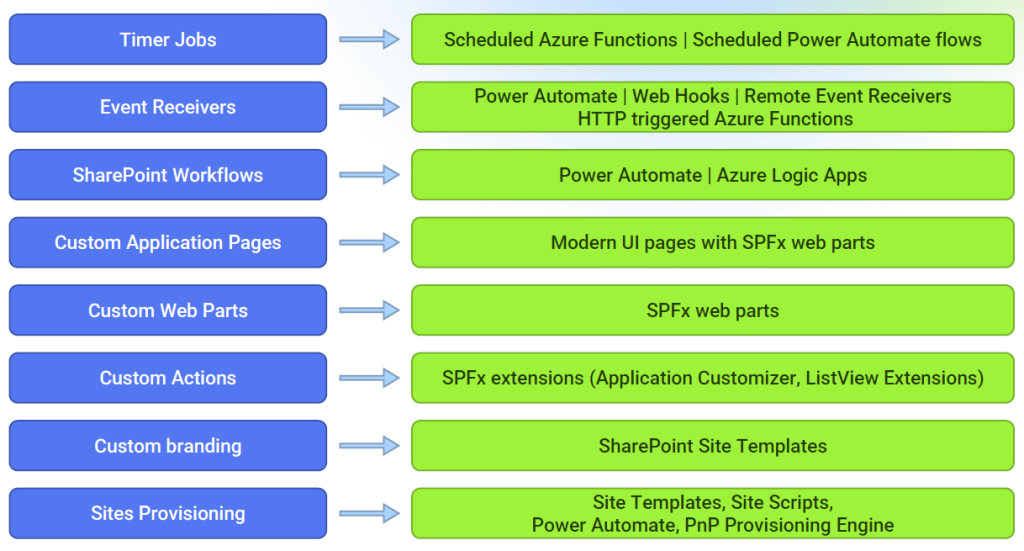
Customizations Mapping
Below you can find typical replacements for classic SharePoint experience’s features available in SharePoint Online:
Common Migration Scenarios
Based on our experience, companies are usually faced with following types of SharePoint migration:
- Migration from SharePoint On-Prem to SharePoint Online.
- Partial Migration - Hybrid solution with SharePoint Online and On-Prem.
- Upgrading SharePoint On-Prem - Migration from older to new versions of SharePoint On-Prem.
- Migration to SharePoint Online from other content management platforms.
Real-Life Success Story: Ascom, global provider of communication and collaboration solutions for healthcare and enterprise organizations
Challenge Given Ascom’s highly regulated industry, GDC Services needed to ensure strict adherence to all regulatory and legislative requirements, which necessitated comprehensive User Acceptance Testing (UAT). Solution GDC Services implemented a two-fold approach: content migration and solution development, carried out in parallel to ensure efficiency and minimize downtime for Ascom:
Key components of the solution included:
- Workflow migration and redesign: Forms and workflows were not just migrated but also redesigned to fit into the new system.
- Advanced customizations: To address specific business requirements, GDC Services developed several unique customizations that could be covered by SharePoint OOB features.
- Migration tooling: Using ShareGate as the primary migration tool, the team conducted detailed analyses, troubleshooting, and post-migration issue resolution to ensure a smooth transition.
Results The migration project marked a major milestone for Ascom, as it successfully transitioned to an operational SharePoint Online environment. GDC not only ensured the seamless transfer of data, but also went beyond by addressing the unique demands of Ascom’s workflows and business processes. The new environment was tested to guarantee the integrity of all migrated data, with custom scripts developed to verify its accuracy at every stage. More details can be found here.
Moving Forward
All our Migration projects always start from a Discovery phase which is intended to collect detailed information about current SharePoint environment, customizations and volumetrics. This phase allows us to define the migration scope in collaboration with business stakeholders by reviewing content usage, workflows and customizations to analyze the usage of out-of-the-box (OOB) features to work out the migration and replacement plan.
Part of analysis during Discovery including environment analysis, pre-check analysis and test migration will rely on a third-party solution ShareGate (https://sharegate.com).
As a tangible outcome of this stage, you will get a comprehensive migration plan with timelines committed by GDC Services as well as high-level FMO (Future Mode of Operations) design including replacement plan for all OOB features which will represent the target state of your SharePoint environment.